Nejčastější závady pevných disků HDD a jak jim předcházet
Pevné disky (HDD) patří mezi klíčové součásti každého počítače. Ukládají naše vzpomínky, pracovní dokumenty i důležitá data. Bohužel žádný disk nevydrží věčně a některé poruchy mohou přijít zcela nečekaně. Pojďme se podívat na nejčastější problémy, které pevné disky trápí, a především na to, jak jim účinně předcházet. Správná péče a včasná záloha dat vám mohou ušetřit nejen peníze, ale i cenné informace.
1. Mechanické poškození ploten a čtecích hlav
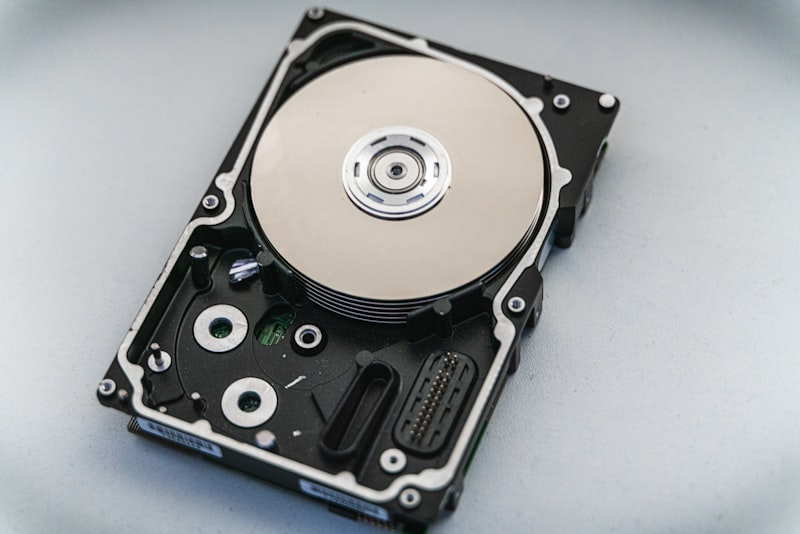
Klasický HDD obsahuje rotující plotny a čtecí hlavy, které se pohybují jen několik nanometrů nad povrchem disku. Každý náraz nebo otřes může způsobit kontakt hlavy s plotnou – tzv. head crash. Tento typ poškození bývá často fatální a obnova dat z takového disku je velmi obtížná. Při normálním provozu se hlavy při vypnutí disku automaticky přesunou do bezpečné parkovací zóny, ale pokud k nárazu dojde během otáčení ploten, riziko poškození je velmi vysoké.
Jak tomu předejít:
- Nepřenášejte počítač v době, kdy disk pracuje
- Používejte kvalitní PC skříně s tlumením vibrací
- Pokládejte notebooky opatrně a nenoste je v zapnutém stavu
- Externí disky přepravujte v ochranných pouzdrech
- Před přenosem počítače nejprve počkejte na úplné vypnutí systému
2. Přehřívání pevného disku
Vysoká teplota je tichý zabiják pevných disků. Když HDD dlouhodobě pracuje při teplotách nad 50 °C, jeho životnost se výrazně zkracuje. Přehřívání způsobuje rozpínání součástek, degradaci maziva v ložiscích a může vést i k poškození magnetické vrstvy na plotnách. Ideální provozní teplota většiny pevných disků se pohybuje mezi 30 °C a 45 °C, proto je důležité sledovat teplotní poměry uvnitř skříně.
Jak tomu předejít:
- Zajistěte dostatečné proudění vzduchu uvnitř skříně PC
- Pravidelně čistěte ventilátory a filtry od prachu
- Sledujte teplotu disku pomocí programů jako CrystalDiskInfo
- V případě potřeby přidejte další ventilátor nebo chladič HDD
- Nepokládejte notebook na měkké povrchy, které brání větrání
- Ujistěte se, že kabely neblokují ventilační otvory
3. Opotřebení ložisek motoru
Motor, který roztočí plotny pevného disku, obsahuje ložiska s omezenou životností. Po letech provozu se ložiska opotřebují, což se projevuje neobvyklými zvuky – klikáním, pískáním nebo drhnutím. Jakmile disk začne vydávat podivné zvuky, je to jasný varovný signál. Životnost ložisek závisí na intenzitě využití, teplotě a počtu startů a zastavení disku, proto je vhodné dbát na správné provozní podmínky.
Jak tomu předejít:
- Vyhýbejte se častému zapínání a vypínání počítače
- Nastavte rozumný interval uspávání disku (příliš krátký ne)
- Uchovávejte disk pokud možno v horizontální poloze
- Zálohujte data pravidelně – opotřebení ložisek nelze zcela zastavit
- Vyhněte se provozu disku v prašném prostředí
4. Poškození způsobené výpadky proudu
Náhlé výpadky proudu nebo kolísání napětí mohou poškodit elektroniku disku a způsobit poškození dat. Pokud disk právě zapisuje data a dojde k výpadku, může být poškozen souborový systém nebo mohou být ztraceny soubory, které se zapisovaly. Moderní operační systémy používají tzv. journaling, který částečně chrání integritu dat, ale fyzické poškození zápisu přesto není vyloučeno.
Jak tomu předejít:
- Používejte kvalitní zdroj (PSU) s ochrannými obvody
- Pro důležité počítače investujte do záložního zdroje (UPS)
- Používejte přepěťovou ochranu
- Externí disk nikdy neodpojujte bez bezpečného vysunutí
- Pravidelně ukládejte důležité dokumenty během práce
5. Degradace magnetické vrstvy a vadné sektory
Vadné sektory jsou poškozené oblasti na povrchu plotny, do kterých nelze spolehlivě zapisovat ani z nich číst. Vznikají přirozeným stárnutím, ale také nárazy, přehříváním nebo výrobními vadami. Malý počet vadných sektorů může disk přemapovat do rezervní oblasti, ale rostoucí počet signalizuje blížící se konec životnosti. S.M.A.R.T. atributy jako Reallocated Sector Count nebo Current Pending Sector Count vám tyto změny pomohou odhalit včas.
Jak tomu předejít:
- Pravidelně kontrolujte zdraví disku pomocí diagnostiky S.M.A.R.T.
- Spouštějte kontrolu disku (CHKDSK) alespoň jednou za měsíc
- Všímejte si varovných signálů – zpomalení, zamrzání, chyby čtení
- Při prvních příznacích problémů okamžitě zálohujte data
- Nevystavujte disk náhlým teplotním šokům
6. Poškození elektroniky disku
Řídicí elektronika na spodní straně HDD může selhat kvůli přepětí, statické elektřině nebo zkratu. U některých typů poruch je možné obnovit data výměnou PCB desky, ale jde o složitý proces. Statická elektřina při manipulaci s diskem je častou příčinou poškození, proto byste měli vždy dodržovat bezpečnostní postupy.
Jak tomu předejít:
- Před manipulací s diskem se uzemněte
- Nepokládejte disk na vodivé povrchy
- Chraňte počítač před přepětím ze sítě
- Používejte antistatický náramek při montáži
- Nepokoušejte se o vlastní opravu elektroniky disku
Kdy je čas disk vyměnit?
Pokud si všimnete některého z těchto příznaků, měli byste začít uvažovat o výměně HDD. Včasná výměna starého disku za kvalitní repasovaný kus může předejít ztrátě dat a zbytečným nákladům na obnovu informací.
- Časté chyby čtení nebo zápisu
- Neobvyklé zvuky (klikání, pískání, drhnutí)
- Výrazné zpomalení diskových operací
- Rostoucí počet vadných sektorů v diagnostice
- Disk není systémem rozpoznán
- Pravidelné samovolné restarty nebo zamrzání počítače
Kvalitní repasované disky jako spolehlivá volba
Pokud potřebujete vyměnit starý nebo poškozený pevný disk, nemusíte vždy sáhnout po nejdražším novém modelu. Repasované disky HDD a SSD jsou použité a otestované komponenty, které procházejí důkladnou kontrolou. Většina z nich byla vytažena z plně funkčního PC, a proto nabízejí výborný poměr ceny a spolehlivosti. Každý repasovaný disk u nás projde základními testy čtení a zápisu, kontrolou S.M.A.R.T. hodnot i vizuální inspekcí.
V importpc.cz najdete široký výběr kvalitních repasovaných pevných disků se zárukou 12 měsíců. Každý disk důkladně diagnostikujeme a otestujeme, takže můžete nakupovat s jistotou. Ať už hledáte HDD na zálohování nebo rychlý SSD pro operační systém, u nás najdete to pravé. Díky přísnému výběru a garanci funkčnosti jsou naše repasované disky oblíbenou volbou pro domácí i firemní uživatele.